Maybe you’ve been thinking about starting a blog for a while, but one question keeps getting in the way:
When would I ever find the time?
I understand. As a mom of three, so much of my day already belongs to someone else. Between raising kids, working from home, and everyday family life, I didn’t start blogging because I suddenly had hours of free time—I started with the time I had.
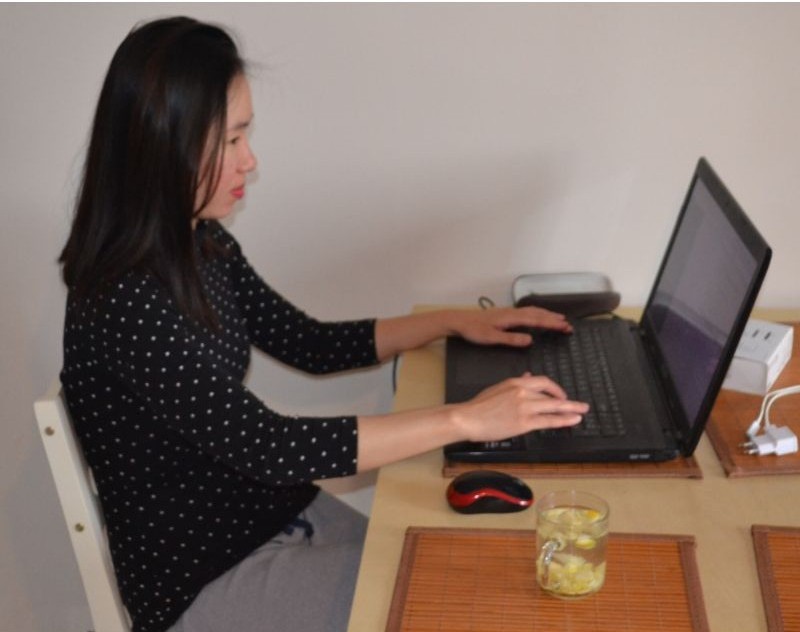
I didn’t wait until I had more time, a home office, or the perfect conditions to start blogging. I started at my kitchen table at 5 AM. And I’m still showing up, one morning at a time.
I’ve shared more about what that actually looks like in How I Work From Home With a Toddler Without Going Crazy
And that’s one of the things I love about blogging: you can start small.
Maybe you have experiences that could help someone else. Maybe you want a creative space of your own. Or maybe you’d love to turn what you know into useful content that could eventually grow into an online income stream.
Disclosure: This post may contain affiliate links. If you purchase through these links, I may earn a small commission at no additional cost to you. As an Amazon Associate, I earn from qualifying purchases. For more information, please read my full Affiliate Disclosure
You don’t need to know everything before you begin.
You just need to take the first step—and I’ll walk you through it.
Why Start a Blog as a Busy Mom?
You might be wondering whether starting a blog is really worth adding to an already-full schedule.
For me, one of the best things about blogging is that you can build it around your life. You don’t need an office, a huge budget, or hours of uninterrupted time every day.
I recommend keeping a notebook nearby for all those random blog ideas that seem to pop into your head while you’re making dinner, folding laundry or getting the kids ready for bed.
I liked this fun spiral notebook called Stuff I Absolutely Need to Remember But Will Probably Forget, which feels very appropriate for mom life! You can use it to keep your blog ideas, post ideas and little reminders all in one place.
Share What You Already Know
You probably know more than you realize.
Maybe you’ve discovered ways to keep little kids busy, organize your home, save money, cook for a family, work from home, travel with children, or manage an incredibly busy schedule.
Those everyday experiences could be exactly what someone else is searching for online.
Build Something of Your Own
Motherhood involves giving so much of ourselves to other people.
There’s something special about having a project that’s yours—your ideas, your creativity, your voice, and something you can continue building little by little.
Work Around Your Family
Blogging is flexible.
You might write while your toddler naps, research an article after bedtime, or work while the kids are at school.
You don’t have to build everything at once.
Learn Valuable New Skills
Blogging has taught me much more than simply how to write articles.
Along the way, you can learn about WordPress, SEO, Pinterest, analytics, email marketing, affiliate marketing, content creation, and other digital skills.
Build Toward an Online Income Stream
A blog can also become a business.
As your content and traffic grow, potential monetization methods include affiliate marketing, display advertising, digital products, sponsored content, and services.
It isn’t quick or guaranteed income. Building a blog takes time and consistent work.
But every useful article you publish becomes another piece of something you’re building.
So, how do you actually start?
Let’s do it step by step.
How to Start a Blog as a Busy Mom: Step by Step
Step 1: Decide What You Want to Blog About
Before you worry about hosting, WordPress, or how your website will look, start with one question:
What could I happily help other people with?
This is often called choosing your blog niche—the main topic or group of related topics your blog focuses on.
You don’t necessarily need years of professional experience. Your own experiences, skills, interests, and lessons you’ve learned can all become useful content.
Your blog could be about:
- Parenting or kids’ activities
- Recipes and meal planning
- Home organization
- Budgeting
- Working from home
- Travel
- Gardening
- Crafts and DIY
- Books
- Productivity
- Fitness
- A professional skill you already have
When choosing your topic, ask yourself:
What do I enjoy or know something about?
What problems could I help someone solve?
Are people searching online for this information?
Don’t put too much pressure on yourself to find the “perfect” niche. Choose a direction that gives you plenty to talk about and room to grow.
Step 2: Choose a Name for Your Blog
Now for one of the fun parts: choosing your blog name.
Try to choose something that’s easy to remember, easy to spell, and broad enough to grow with you.
My own blog is called Mama of 3 Hearts. While I started by sharing activities for kids, the name gives me room to talk about other parts of motherhood too—including working from home, productivity, books, and what I’m learning while building this blog.
Don’t spend weeks searching for the perfect name, though.
Your content will ultimately matter much more than finding the cleverest possible name.
Once you have a few ideas, check whether the matching domain name is available.
A domain is simply your website’s address.
For example, mine is:
mamaofthreehearts.com
And this brings us to the part that can sound technical when you’re completely new—but is actually much simpler than it seems.
Step 3: Get Your Domain and Web Hosting
To put your blog online, you basically need two things:
A domain name — your blog’s address on the internet.
Web hosting — the service that stores your website and makes it available online.
Think of it this way:
🏠 Domain: your home’s address
🏠 Hosting: the actual house
🛠️ WordPress: what you use to build and furnish the house
📝 Blog posts: the things you put inside
The Hosting Option I Recommend for Beginners
If you’re starting your first blog and want to keep the setup as simple as possible, one option worth considering is Bluehost.
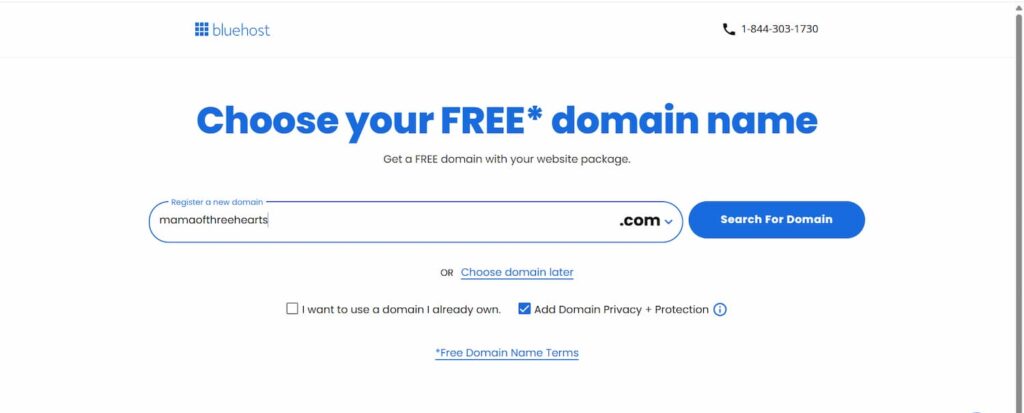
One thing I especially like for new bloggers is that all Bluehost WordPress hosting plans include a free domain for the first year with eligible 12- or 36-month hosting terms.
That means you can get your hosting and choose your new blog’s domain in the same place instead of purchasing them separately.
Bluehost’s WordPress plans also include a free SSL certificate, WordPress tools, and 24/7 support, so you can get the main pieces you need to start your blog in one place.
Check Bluehost’s Current WordPress Hosting Plans
How to Start Your Blog With Bluehost
I’ll walk you through the basic process so you know what to expect before signing up.
1. Go to Bluehost
Open Bluehost’s WordPress hosting page and check the current options.
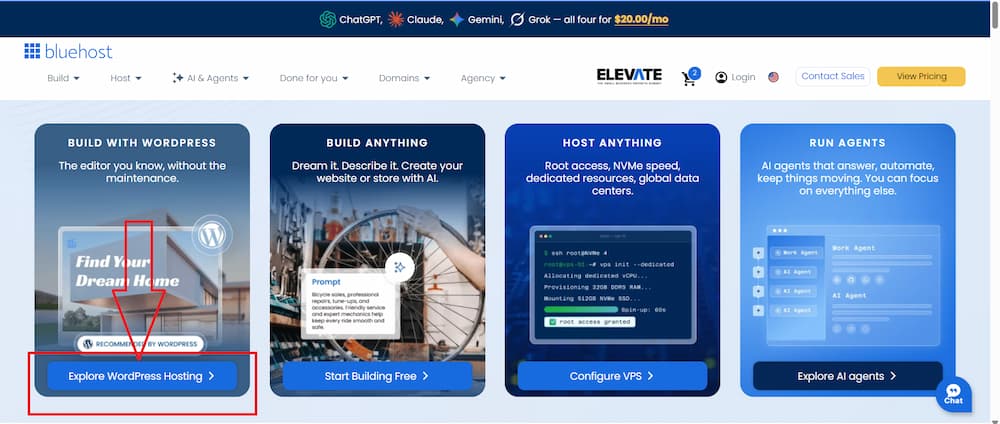
SEE BLUEHOST’S CURRENT WORDPRESS HOSTING OPTIONS
2. Choose the Cheapest Plan
When you’re starting your first blog, you don’t need to pay for the biggest hosting plan.
I recommend keeping things simple and choosing Bluehost’s cheapest WordPress hosting plan to get started.
The Starter plan already gives a new blogger the essentials needed to build a WordPress blog, including hosting, a free SSL certificate, and a free domain for the first year.
You can always upgrade later if your blog grows and you need more resources.
3. Choose Your Free Domain
Remember the blog name you came up with in Step 2?
Now you can turn it into your actual website address.
Bluehost’s WordPress hosting plans include a free domain for your first year with eligible 12- or 36-month hosting terms, so you can choose your domain as part of the setup instead of purchasing it separately.
For example, if your blog is called The Organized Mama, you might look for:
theorganizedmama.com
Type in the domain you’d like and see whether it’s available.
Try to choose a domain that’s:
- Easy to spell
- Easy to remember
- Relatively short
- Flexible enough to grow with your blog
Don’t worry if your first choice isn’t available. Try a few simple variations rather than adding lots of numbers, hyphens, or complicated spellings.
4. Create Your Account
Continue through the account setup process and enter your information carefully.
5. Review Everything Before Paying
Don’t rush through checkout.
Check the plan you’ve selected, billing period, introductory pricing, renewal terms, optional products, and the total amount you’ll be charged.
You don’t have to purchase every optional extra simply because it’s presented during checkout.
6. Complete Your Purchase and Start Building
Once you’re happy with your selections, complete the signup process.
And suddenly that blog you’ve been thinking about isn’t just an idea anymore.
It has somewhere to live.
If you look at your new dashboard and think:
Okay… now what?
Don’t worry.
That’s exactly what we’re doing next.
Step 4: Set Up WordPress
Once you have your domain and hosting, it’s time to set up the place where you’ll actually create your blog.
For many bloggers, that means WordPress.
WordPress is the software you’ll use to create pages, publish articles, upload images, organize your content, and manage your website.
And you don’t need to know how to code to use it.
If you’re using WordPress hosting such as Bluehost, follow the host’s current onboarding process to get WordPress connected to your site.
Once you’re inside WordPress, the dashboard may look a little intimidating.
That’s normal.
You don’t need to understand every button before publishing your first article.
Learn what you need as you need it.
That’s how I learned too.
Step 5: Choose a Simple WordPress Theme
Now comes the part where it’s surprisingly easy to lose an entire week:
making your blog look pretty.
You start changing fonts.
Then colors.
Then your logo doesn’t quite look right.
Then you find another theme you like…
Before you know it, you’ve spent days designing a blog that still doesn’t have anything for people to read.
Try not to fall into that trap.
Look for a theme that’s:
- Mobile-friendly
- Easy to navigate
- Fast
- Clean and readable
- Flexible enough to grow with you
You can change your colors, fonts, images, and other design elements later.
Your first goal isn’t to create the world’s most beautiful blog. Your first goal is to start publishing useful content.
Step 6: Create Your Essential Blog Pages
Before filling your website with articles, create a few basic pages.
About Page
Tell readers who you are, why you created your blog, and how your content can help them.
Contact Page
Give readers and potential business partners an easy way to contact you.
Privacy Policy
Your legal requirements will depend on factors such as where you operate, where your readers are located, and what data and technologies your website uses.
Don’t simply copy another blogger’s legal pages.
Affiliate Disclosure
If you use affiliate links, clearly disclose that relationship.
For example, if I recommend something through an affiliate link and someone makes an eligible purchase, I may receive a commission at no additional cost to that person.
Transparency matters.
Depending on your circumstances, your website may require additional legal disclosures or policies. Get appropriate professional guidance if you’re unsure.
Step 7: Write Your First Blog Posts
Your website exists.
Now comes the part that actually turns it into a blog:
creating useful content.
Instead of only asking, “What do I feel like writing about?”, start asking:
What does my ideal reader need help with?
For example, instead of:
What We Did With the Kids This Weekend
you might create:
25 Easy Rainy Day Activities for Kids Using Things You Already Have at Home
The second article solves a specific problem.
Start With Related Topics
You don’t need 50 random articles.
Choose a core topic and create several useful posts around it.
If your blog is about working from home as a mom, for example:
- How to Work From Home With a Toddler
- A Realistic Work-From-Home Schedule for Moms
- How to Stay Productive Working From Home
- Small Home Office Ideas
- How to Get Work Done When the Kids Are Home
Then link relevant articles together.
And don’t wait until you have 20 perfect posts before considering yourself a blogger.
Publish the first one. Then write the next one.
Step 8: Learn the Basics of SEO
SEO stands for search engine optimization.
It can sound intimidating, but you don’t need to become an SEO expert before writing your first article.
Start with the fundamentals.
Find Out What People Search For
Research the words and questions people use when looking for information related to your topic.
Understand What They Actually Want
Don’t only look at a keyword.
Ask:
What is this person actually trying to find?
Then create content that genuinely addresses that need.
Use Clear Titles and Headings
Make it easy for both readers and search engines to understand what your article covers.
Add Helpful Internal Links
Connect readers with other relevant content on your website.
Write for Real People
SEO may help someone discover your website.
Helpful content is what makes her want to stay.
Step 9: Start Getting People to Your Blog
Publishing an article doesn’t automatically mean people will find it.
You’ll need ways for readers to discover your content.
But you don’t need to master every platform at once.
SEO can help your articles become discoverable through Google over time.
It can take patience, particularly with a new website.
Pinterest has been an important traffic source in my own blogging journey.
I use it as a way to help people discover my content rather than thinking about it only as another social media platform.
And if you’d like a glimpse into how I fit work around real family life, read How I Work From Home With a Toddler Without Going Crazy
As your audience grows, you might also decide to start an email list so readers who want to hear from you can stay connected.
But don’t tell yourself you need Google, Pinterest, Instagram, Facebook, YouTube and an email newsletter mastered during your first week.
Start with what makes sense for your blog.
Step 10: Understand How Blogs Make Money
If part of your reason for starting is eventually creating an online income stream, you’re probably wondering:
How does a blog actually make money?
There are several possibilities.
Affiliate Marketing
Affiliate marketing means recommending a product or service through a tracked affiliate link.
When someone makes an eligible purchase, the publisher may receive a commission.
For example, if you choose Bluehost through an affiliate link in this guide, I may receive a commission at no additional cost to you.
Good affiliate marketing isn’t about adding links to everything.
It’s about recommending something relevant when it genuinely helps your reader take the next step.
Display Advertising
Bloggers can also earn revenue by displaying advertisements on their websites.
This is one of the ways I monetize my own blog.
Digital Products
Depending on your niche, you might eventually create printables, templates, ebooks, guides, courses, or other products.
Sponsored Content
Some brands pay publishers or creators for appropriate partnerships and sponsored campaigns.
Services
Your blog can also showcase skills that lead to writing, consulting, design, coaching, or other services relevant to your expertise.
You don’t have to choose every monetization method today.
First build something useful.
Your audience, skills, and monetization opportunities can grow from there.
How Do You Find Time to Blog When You’re a Busy Mom?
This might be one of the most important questions in this entire guide.
My biggest advice is:
Stop waiting for the perfect block of free time.
Break blogging into smaller pieces.
A realistic week might look like:
Monday: Research one topic
Tuesday: Create the outline
Wednesday: Write
Thursday: Edit
Friday: Add images, publish, and promote
Your schedule doesn’t need to look exactly like mine.
Some weeks you’ll accomplish more.
Other weeks a child gets sick, work becomes crazy, or life simply happens.
The goal isn’t perfection.
The goal is to keep coming back.
What You DON’T Need to Start a Blog
Let’s remove a few things from your mental to-do list.
You don’t need:
- A perfect website
- An expensive theme
- Professional photography equipment
- Thousands of followers
- 20 finished articles
- Advanced technical knowledge
- Eight uninterrupted hours every day
- Every monetization strategy figured out
- The perfect logo
- To know everything about SEO
You will learn an enormous amount simply by doing.
You need an idea, somewhere to publish it, and the willingness to keep learning.
What I Would Do Differently If I Started My Blog Again Today
If I were starting again, I would spend much less time worrying about making everything perfect.
I’d choose one clear audience and ask:
What does this person need help with?
Then I’d research the questions she’s already asking and create genuinely useful content around them.
I’d focus on learning one main traffic strategy instead of feeling like I needed to be everywhere.
And I’d learn about monetization early—not because I’d expect immediate income, but because understanding how a blog can become a business would help me make better decisions about what I’m building.
Most importantly, I wouldn’t wait until I felt completely ready.
Blogging involves figuring things out as you go.
Start. Learn. Adjust. Keep going.
Frequently Asked Questions About Starting a Blog
Can I Start a Blog With No Experience?
Yes. Every blogger once had a first website and a first article.
You can learn WordPress, SEO, content creation, Pinterest, affiliate marketing, and other skills gradually.
Do I Need to Know How to Code?
No. You don’t need to know how to code to start a WordPress blog, although you’ll probably encounter technical things you’ll need to learn along the way.
How Much Time Do I Need for Blogging?
There isn’t a magic number.
Find a sustainable rhythm that works with your life. Even a few focused hours spread throughout the week can move your blog forward.
How Many Posts Should I Write Before Launching?
You don’t need dozens.
I’d rather see a beginner publish a small number of genuinely useful articles and continue creating than spend months waiting for the “perfect” launch.
Can You Really Make Money From a Blog?
Blogs can generate revenue through advertising, affiliate marketing, sponsored content, products, and services.
But income isn’t guaranteed, and building meaningful traffic and revenue usually takes time.
Treat blogging as something you’re building—not a shortcut to fast money.
Do I Need Social Media?
No.
Start with your website and useful content. You can choose appropriate traffic and audience-building channels as your blog grows.
Ready to Start Your Blog?
Maybe you’ve been thinking about starting for months.
Maybe it’s been years.
And maybe you’ve been waiting for life to become less busy before finally beginning.
As a mom, I’m not convinced that magical season where there’s suddenly nothing left on the to-do list ever arrives.
So don’t tell yourself you have to build an entire blogging business this week.
Just take the first step.